by Laurel Steinetz, Communications Manager
With the holidays approaching, scammers are upping their game. Large data breaches and artificial intelligence are making their jobs even easier. Learn how to protect your personal information, spot a scam, and what to do if you are a victim to a scam.
One of the most common scams is “phishing.” Scammers send millions of automated emails, text messages, phone calls, and social media direct messages every day. These messages might be unbelievable, such as a Nigerian Prince who emails you, saying they want to send you hundreds of pounds of rubies; all you have to do is pay $2,000 for shipping and tariffs. These messages were often riddled with misspellings, easily debunked facts, and inconsistencies between messages.
Newer scams are very sophisticated
Scammers seem legitimate
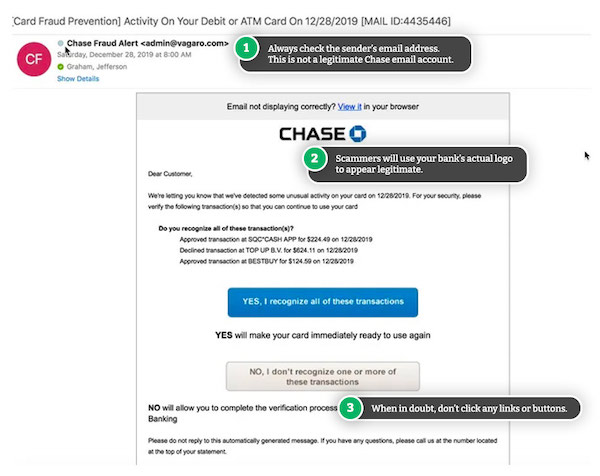
Always check the sender’s email address carefully- many scammers will create email addresses that look like a real bank at first glance, such as:
alerts@chasebannk . com (“Bank” has an extra “n”)
info@huntlngton . com (the “i” in Huntington is actually an “L”)
admin@WELLSFARG0 . com (the “o” in “Fargo” is actually a zero)
Carefully review the sender line of emails and the “from” email address. If you’re not sure, ask a friend or family member to take a look before you do anything else.
____________________________________
Scammers are creative
Phishing emails and text messages often tell a story to trick you into clicking on a link or opening an attachment. The link or attachment stealthily downloads a virus onto your device, which can be used to access your location, passwords, browsing activity, financial information, contacts, private conversations, and more.
Or, you might get a message that looks like it’s from a company you know or trust, like a bank, credit card, utility company, or payment app like Venmo, PayPal or CashApp. The message might be about:
- Suspicious account activity or log-in attempts
- Problems with your account or payment info
- Asking to confirm personal or financial info
- An invoice you don’t recognize
- Asking you to click a link to make a payment
- Eligibility to register for a government refund
- A coupon for free stuff
Here are some ways to spot red flags about scams from “Banks Never Ask That” (an effort by the American Bankers Association dedicated to empowering consumers with the tools they need to spot bogus bank communications).
____________________________________
Scammers are persistent
Scammers are smarter and have more tools than ever. According to Breachsense: Over 4,100 publicly disclosed data breaches happened in 2024 alone. That’s roughly 11 breaches per day, and that is based only on the publicly disclosed data!
With machine learning and artificial intelligence, scammers can take “anonymized” data from credit card companies, health insurers, banks, etc. and match it to real people. A scammer can call your phone number, say that your bank account is compromised, tell you the last four digits of your social security number, tell you part or all of your bank account number, and once you think they’re legitimate, they can work to get access to your bank account.
____________________________________
Scammers are ruthless
Scammers can easily identify if a target has family members through social media, shared addresses, public records, and more. Even scarier, scammers can make an A.I. voice print of real individuals or a generic “teenage grandson” or “young adult niece.”
If you get an urgent phone call from a family member or friend saying they are in trouble and need you to send money, don’t be afraid to hang up immediately and call a phone number you already have for them. Make a note of the number they called from in case you need to involve law enforcement.
____________________________________
How to Protect Yourself
With all the technology and strategies being used to try to separate us from our money, it can feel like a losing battle. But by taking a deep breath, slowing down, and learning a few tips, you can protect yourself from scams!
Be Vigilant with Communications: Phishing attempts often follow a data breach. Be wary of emails, text messages, or phone calls that ask for personal information. You should also be suspicious if the sender/caller has your personal information already. Massive data breaches have exposed lists of people’s names, contact information, last four digits of their social security number, and other personal information. Scammers obtain these lists and “go phishing.”
Don’t Rush; Take a Deep Breath: Scammers will try to scare you into thinking you must act immediately:
“Your bank account has been closed due to fraud.” “A new line of credit has been opened in your name.” “Your electricity is at risk for being shut off.” “Your brother has been kidnapped.”
These are terrifying situations–and they are likely not happening. Call the phone number on the back of your bank card. Pull your free credit report. Call the phone number for the electric company on your electric bill. Call your brother’s cell phone or go see him. If there is a legitimate issue, you will need a cool head to face it.
Create Passkeys: When you have a chance to create a Passkey, do it. Passkeys replace passwords and don’t require you to remember anything to access your accounts. This makes them more secure than a password. A Passkey is a physical kind of “password,” often a fingerprint scan or face ID scan. There are also USB devices that plug into your computer to authorize logging into your accounts. Passkeys are specific to the device and are un-hackable.
Use Strong and Unique Passwords: If you can’t use a Passkey, avoid reusing passwords across multiple accounts. Use a password manager application to create and store long passwords. Learn about the differences between password managers from Wired.com.
Enable Multi-Factor Authentication (MFA): If you have to use a password, be sure to enable MFA on all online accounts whenever possible. This is especially important for sensitive accounts like banking, health records, and email. Multi-Factor Authentication can also be called Two-Factor Authentication (2FA or TFA).
Monitor Financial Accounts: Regularly check bank and credit card statements for suspicious activity. Call the number of the back of your card if you notice anything unusual or unauthorized.
Freeze Your Credit: Placing a freeze on your credit can prevent unauthorized accounts being opened in your name. Freezing your credit can also reduce the number of credit card offers you get in the mail. Learn more about credit freezes and credit monitoring on USA.gov.
____________________________________
What To Do With a Suspicious Message
Don’t click any links or download any attachments
Clicking a link or downloading an attachment could allow the scammers to stealthily put a virus on your computer, tablet, or phone, which can be used to access your location, passwords, browsing activity, financial information, contacts, private conversations, camera, and more.
Don’t reply to the email or text
By replying “STOP” or “OPT OUT” to unwanted messages, you indicate that the email address or phone number belongs to someone–and you’ll get tons more messages from the same scammer and anyone they sell your data to.
If the message sender is impersonating a real person or organization you use, contact the person or organization using another method. Ideally you should contact them with a phone number you already have for them or wait to talk to them in person.
If you don’t have contact information for your bank or utility company saved in your address book, Contacts app, etc., find the phone number for your bank on the back of your credit/debit card, a mailed utility bill or account statement, or published in the phone book (analog research is great!). Scammers create websites that look just like your bank website, with a fake phone number so YOU can dial the scammer at your convenience! Be especially wary if you use a search engine with a “AI Summary” or “Suggested Results.” Though sometimes convenient, those boxes often contain outdated information or have been outsmarted by scammers to display a fake bank phone number/website.
Report the Scam
Block the sender and mark it as “Spam” or “Phishing.” Your email service/text messaging application might use slightly different terms. Don’t click any “unsubscribe” links at the bottom of suspicious messages.
You can also forward phishing emails to ReportPhishing@AntiPhishing.org. The Anti-Phishing Working Group (a group of Internet Service Providers, security vendors, financial institutions, and law enforcement agencies) uses these reports to fight phishing.
____________________________________
What To Do If You Are a Victim of a Scam
Alert the Companies In Question: Call the companies where you know fraud has taken place. That means calling the fraud department and explaining what has happened. Ask them to close or freeze your accounts. Alert them of any fraudulent charges and ask them to remove/refund them.
Change Your Passwords: Change all of your passwords and logins for your affected accounts and any other accounts that share the same username and/or password. Don’t use the same (or similar) password for more than one account. Although it may be easier to remember your logins, using the same password makes it easier for scammers to steal your identity and money. Use a password manager if you’re having trouble remembering so many passwords or even creating strong passwords.
Contact Your Bank: If you think your credit or debit cards have been compromised, contact your bank and have your cards canceled and replaced. If you notice any fraudulent charges or withdrawals, dispute them and ask for them to be refunded. Most banks won’t have a problem refunding charges that weren’t yours.
Place a Fraud Alert: Contact one of the three credit bureaus (Equifax, Experian, or TransUnion) and place a free fraud alert. When you place a fraud alert, any business must verify your identity before issuing new credit. This is especially important if you’re concerned your identity may be stolen.
Report the Scam to the Authorities: Report the scam to the authorities so they can investigate it and hopefully put a stop to the criminals. Although this step is unlikely to help you recoup any of your losses, it does help with the bigger picture, helping authorities catch scammers and educate others, so there are fewer victims in the future. Make sure you file a complaint with the FBI’s Internet Crime Complaint Center (IC3).
Correct Your Credit Report: If you notice someone has gotten credit in your name (e.g., applied for a credit card), write to each of the three credit bureaus to get your credit report fixed.
Continue Monitoring Your Accounts: Even after your credit report has been corrected, it’s essential to keep monitoring it. You are entitled to one free credit check per week from AnnualCreditReport.com. Although this may seem like an arduous task, you never know when a scammer will use your information again and leave you in thousands of dollars in debt.
Share Your Story: This is an important one–almost everyone has been targeted for a scam either individually or by a mass email. If you are the victim of a scam, don’t be ashamed. Tell others what happened so they can help you and so they can watch out for the same scam.
This article was written after a parishioner shared their experience of being scammed. They wanted to help others to be on guard and warn about how sophisticated the scam caller was. The caller had the last four digits of the parishioner’s social security number, part of a bank account number, and other information that we think only our real bank would have.
Luckily, this person quickly realized what was happening and was able to close the compromised bank account. Even though I follow this topic closely, I had never heard of a scammer calling with that much information! Talking about this unfortunate fact of life will reduce the feelings of shame when it happens to us. It reminds us to watch out for ourselves and each other.
____________________________________
Additional Resources:
Protect Yourself, Banks Never Ask That: https://www.banksneveraskthat.com/en/protect-yourself
Take the Scam Quiz: https://www.banksneveraskthat.com/en/scam-quiz
Are You Cyber Safe? Quiz: https://www.idtheftcenter.org/are-you-cyber-safe
____________________________________
Sources for this article:
How to recognize and Avoid Phishing Scams, Federal Trade Commission (FTC): https://consumer.ftc.gov/articles/how-recognize-avoid-phishing-scams
Avoiding Scams and Scammers, Federal Deposit Insurance Corporation (FDIC): https://www.fdic.gov/consumer-resource-center/2021-10/avoiding-scams-and-scammers
How to Identify a Fake Email from Your Bank & Protect Yourself, Verified.org: https://www.verified.org/articles/scams/bank-phishing-emails
How to Recover from Being Scammed, Verified.org: https://www.verified.org/articles/guides/how-to-recover-from-being-scammed
The Most Recent Data Breaches in 2025, Breachsense.com: https://www.breachsense.com/breaches
U.S. Data Breach Landscape in H1 2025, ID Theft Center: https://www.idtheftcenter.org/wp-content/uploads/2025/07/ITRC-H1-2025-Data-Breach-Analysis.pdf